Personalized Greeting Card "Objects" by Simslice:
Greeting cards are thoughtful gifts for friends & are fun to play too because they run inside the game!
First time users, please read all the details below. Repeat visitors can just click the button to continue:
NOTE: Like all Sims 1 items, these are not compatable with the new Sims 2 game. Frankly, many people (myself included) like the Sims 1 game much better.
What is unique about a Simslice Greeting Card?
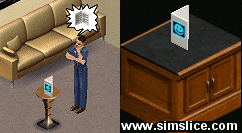
Have you ever sent an electronic greeting card to a friend? For players of The Sims™, this takes that concept to a whole new level. You can have Simslice custom create an object for you, in the form of a greeting card, that works inside the game. If one of your friends has a birthday approaching, special event, holiday, or if you just want to say something nice, you can send a personalized greeting card to them that they can read (and play) in their own game. When their Sim picks up and reads your card, a customized graphic along with your friend's name and a written message from you will pop out for your friend to read. It also comes with a present! A gift (a random object) will materialize next to their Sim after reading your message. This card is a great gift that gives to both player and Sim alike. It will be located in their game's Buy Mode (Decorative) section for five Simoleans and there are no special requirements to use (it will work in any version of The Sims™).
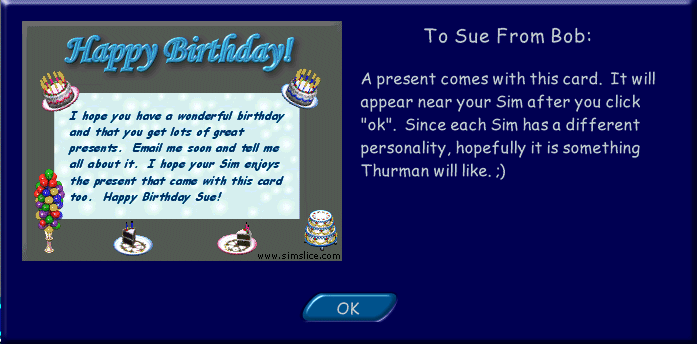
What does my custom message look like in the game? (example)
 You
can choose from any number of different themes, styles, images, fonts
and colors. The blue image at the left is just a sample Birthday Card
in-game message I whipped up for the purposes of this page - click
it to enlarge. Note that the name "Thurman" is simply the name
of my Sim that read this card -- but your card will show the name of your
Sim (or any Sim) that views it.
You
can choose from any number of different themes, styles, images, fonts
and colors. The blue image at the left is just a sample Birthday Card
in-game message I whipped up for the purposes of this page - click
it to enlarge. Note that the name "Thurman" is simply the name
of my Sim that read this card -- but your card will show the name of your
Sim (or any Sim) that views it.
It installs just like any object, but installation information is also included with the download, if needed. Remember, you can vary the theme, style, color, fonts, background and of course text in the image all to your liking (see below). The gameplay functionality of the card will be the same. The smaller images (cakes, balloons, etc.) will vary depending on the chosen theme of your card. You can even create and submit your own image if you prefer.
What actually happens in the game?
First, you "buy" the card in the game (Decorative section) for 5 Simoleans. Then click on the card and select "Read Card". Your Sim will walk up to it, admire it, then pick up the card and read it. At that time, "friendship" music will play and your personalized graphic & message will pop up in a dialog window for you (or your friend) to read. Your Sim will get a small Fun and Social boost. Click the "ok" button when you're done reading it. Your Sim will put the card back down. Then you'll hear a "pixie dust" sound, followed by a special gift that will materialize right next to your Sim. Your Sim will laugh and cheer. No additional gifts will materialize after the first read (only one gift comes per card), but you can read the card over and over anytime you want (and your Sim will still gain some Fun and Social points each time). You can also put multiple cards on your lot, and get a new gift each time each card is read for the first time.
NOTE: Like all Simslice objects, each card we design will have its own unique GUID -- therefore you shouldn't have to worry about duplicate Object ID conflicts in the game. Also, the code has been very well stress-tested and is clean and safe for use with any version of the Sims game.
How do I design my card and send it to someone else?
We have a special form on the next page for this. Just type in what you want the card to say, and pick your theme, style, color, font and background image for your card. Enter your own info and then submit your selections to Simslice along with a $5 (USD) contribution via Paypal to Simslice. We will then custom make your download based on your designs. Then we will email it to you (or to your friend if you prefer). Turn around time will be from 1 to 7 days -- so please give us advance notice of anything you're planning for because it takes time to custom make an object after all... :)
Can I make my own image, or do I have to design one here using your options?
Experienced users of a paint program can make their own image if they prefer (see bottom of page for details). Submit it to us, and Simslice will make it work in the card object for you. We will also provide support for your card object just as we would any object you download from this site. So you will not only be getting a well-tested, clean coded, quality download but also personal customer service if needed.
Are
you ready to get started?
Click the button below to continue to the next page and design your
custom greeting card now!
Experienced Paint Program Users: You can use our image options by clicking the button above, but if you prefer to create your own image for your card instead, we can support that too. You can submit your image to us and we will do the rest for you. Images must be sized at 320 x 240 pixels and be saved in .bmp format. You can also order multiple cards at the same time. Click below if you wish to do that instead.
Click here to send this page to a friend!